The blog of a dedicated radio amateur and electronics enthusiast

"Having fun on the air and in the workshop - communicating and creating"
Showing posts with label MQTT. Show all posts

08 June 2021

Deploying the Remote Soil Moisture Meter

Since the posts on 15 February, 16 and 27 March I have completed the LoRa wireless based remote soil moisture meter and deployed it for use in a herb garden outdoors. To conclude and summarise this project, I have brought some of the previously posted information together with its new features in this post.
The remote module with the moisture sensor pushed into the soil transmits the moisture measurement every hour using a LoRa wireless data link. It is battery and solar powered. The moisture meter will not be required all year round. So the solar panel only has to keep the battery sufficiently charged for a few hours of operation each day during the summer. The solar panel is supported by a tablet stand fixed down with 'P' clips.
Remote module & solar panel deployed outdoors - notice the antenna
The LoRa link receiver module, located indoors, receives the measurement value and displays it on its OLED display. 
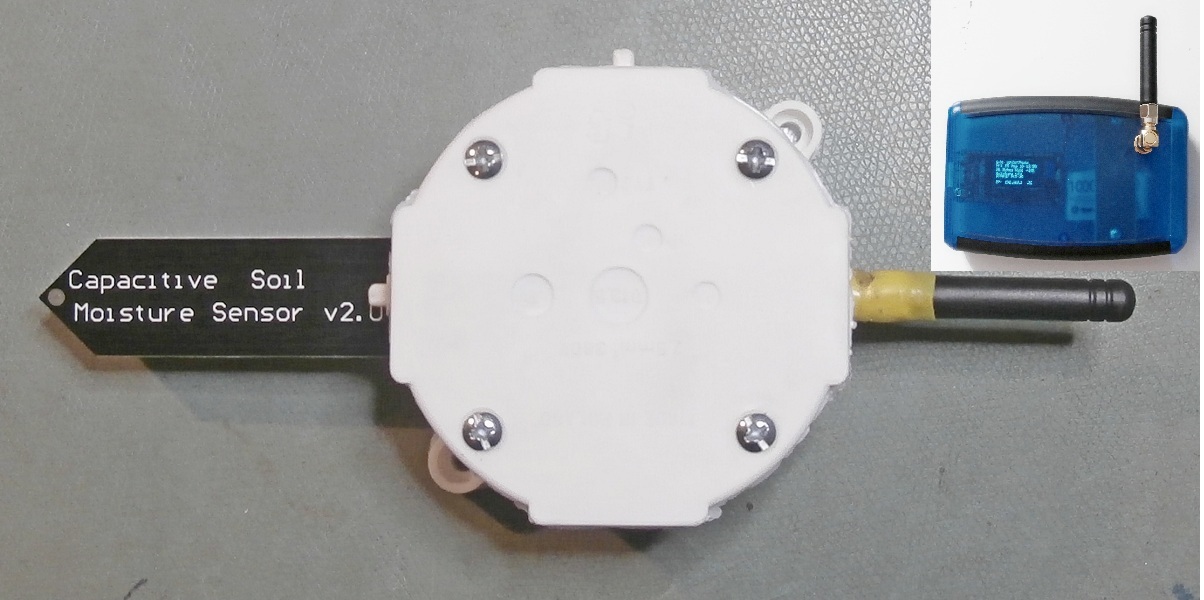
Remote module with antenna & sensor - inset top right the receiver module
If the receiver module is connected to a wifi LAN it can also send the measurement value to a web-page,  my dedicated Android app, and additionally publish the RSSI ( received signal strength indication ) and time on an MQTT broker* ( making the data accessible world-wide ! ). If I have my Node-RED local server up and running, the measurement value can also be sent by email, saved to a file, published on the HiveMQ MQTT broker*,
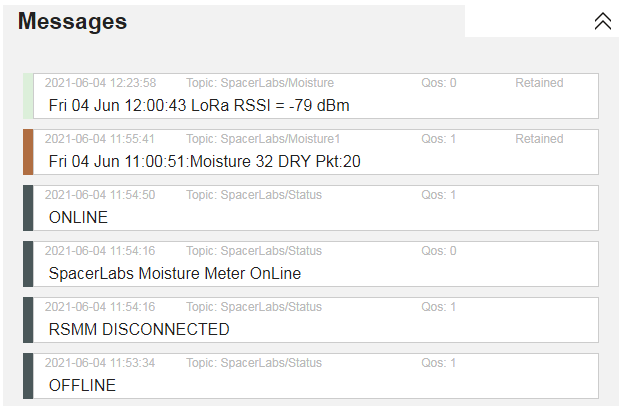
The various message types that are published on the MQTT broker*

and saved to the cloud database of the Ubidots data visualisation platform for presentation.
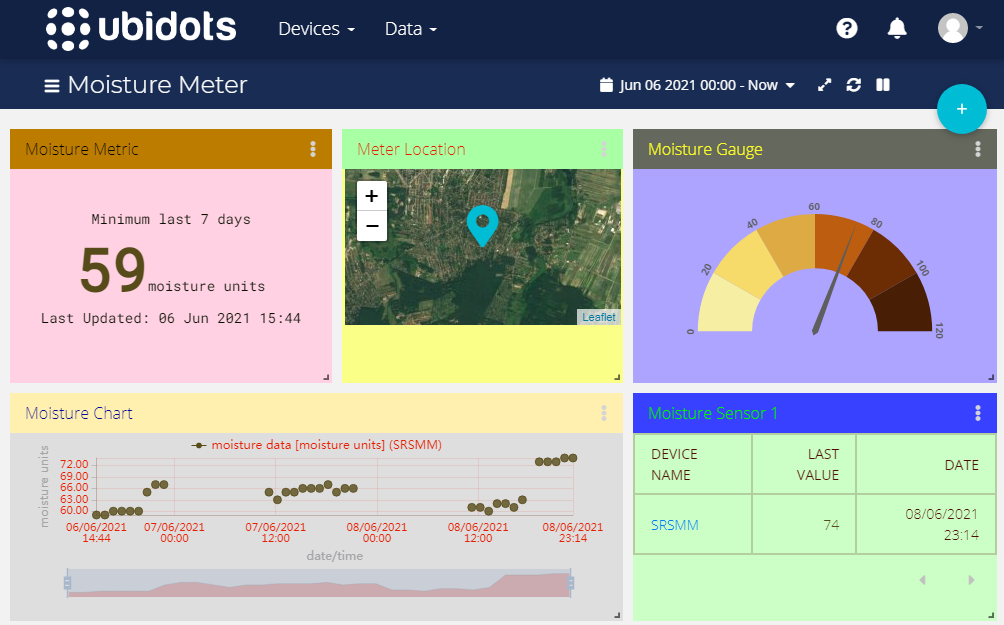
My custom dashboard for presentation of the moisture data on Ubidots
See the previous posts and some recent Tweets going back to 23rd March for details of MQTT, Node-RED, LoRa, the webpage server & Android app.
* Subscribe to the topics SpacerLabs/Status, SpacerLabs/Moisture & SpacerLabs/Moisture1
     

01 April 2021

Using Node-RED with the UV Radiation Meter

Continuing with the theme of Node-RED ( and MQTT ) from the last post ( 27.03.2021 ), I have also created a 'flow' for use with the UV Radiation Meter ( see 12.01.2021 ).
My Node-RED 'flow' for passing UV radiation data to the HiveMQ broker
The 'flow' ( see image above ) starts by periodically reading the UV Index which was measured by the meter, assigns the appropriate W.H.O. level, joins the data as a single message and publishes it to the topic "SpacerLabs/Uvindex" on the HiveMQ MQTT broker. But only if the index has changed.

My messages published to the topic SpacerLabs/Uvindex
Not surprisingly the status of the radiation meter was 'ONLINE' at the time the UV radiation measurements were being made in my backyard. When subscribing to a topic(s) the last message the broker has received from the publishing client, flagged as 'Retained', is displayed to confirm the connection straightaway, without the delay until the next message arrives. Quality of Service, QoS, ( 0, 1 or 2 with 2 being the highest ), is an important part of MQTT. QoS defines a level of guarantee of delivery of messages between broker and client. I selected QoS = 1.  

27 March 2021

Using Node-RED with the Soil Moisture Meter

Node-RED is a programming tool for event-driven applications. 'Flows' to connect inputs to outputs, hardware and online services via 'nodes' are created in a browser based editor in a similar way to 'MIT App Inventor' which I use for my Android apps. I thought of an application for Node-RED with my Soil Moisture Meter ( post 16.03.2021 ).
The events I wanted to handle were to trigger an email to be sent when the soil moisture level was low, save the moisture measurements to a text file and also publish them to an MQTT* broker. The image below shows how I 'wired' nodes together in Node-RED to achieve that.
My Node-RED flow - from input (blue) to outputs (mauve & light green)
Starting at the top left of the flow, every hour the most recent data packet containing the moisture value is read from the webpage ( /Moisturevalue ) hosted by the moisture meter receiver. Only if the text 'dry' or 'partched' is found in the packet string is an email sent. I have preset the body of the email to read "The SpacerLabs Soil Moisture Meter ( Sensor 1 ) has notified a 'low moisture level' alert".
My moisture meter data published on the HiveMQ broker
All packets ( unfiltered ) are published under the topic 'SpacerLabs/Moisture1' to an online MQTT broker. I chose the free public broker 'HiveMQ'. My topic is 'open'; so anyone can connect to www/hivemq.com/demos/websocket-client and subscribe to the above topic to read my hourly data packets under the messages tab. But only when my Node-RED server and the moisture meter are running. I also publish the status, ( ONLINE, OFFLINE or DISCONNECTED ), of the moisture meter to the separate topic 'SpacerLabs/Status'.
More information on Node-RED can be found at nodered.org.
* MQTT Message Queuing Telemetry Transport https://mqtt.org